Page 1 of 1
URGENT: STKO WONT START
Posted: Sat Oct 26, 2024 6:47 am
by kolozvari
Hello,
STKO was working fine and then all of a sudden it won't start. It shows start screen for about 15 seconds and then it crashes. I restarted computer several times, but no luck.
Please advise.
Thank you
Re: URGENT: STKO WONT START
Posted: Sat Oct 26, 2024 7:39 am
by kolozvari
I reinstalled STKO and I still have the same problem. I have been using STKO on this computer for years, so I doubt it is an issue with the computer.
I look forward to hearing from you.
Thank you
Re: URGENT: STKO WONT START
Posted: Sun Oct 27, 2024 5:23 am
by kesavapraba
Hi, Please check if the answer in the link below helps.
viewtopic.php?t=2898#p8989
Re: URGENT: STKO WONT START
Posted: Sun Oct 27, 2024 7:41 am
by kolozvari
That worked, thank you!
Re: URGENT: STKO WONT START
Posted: Sun Oct 27, 2024 9:57 am
by kolozvari
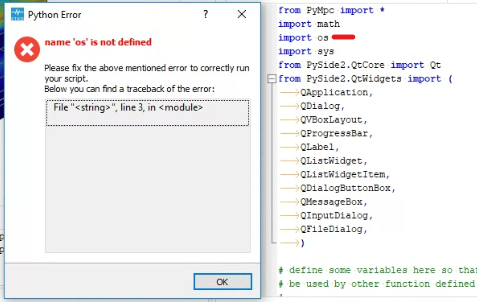
After fixing the error with starting STKO, I encountered the following error when trying to run API Python scripts. I have been running these scripts before with no problem. pip stko is installed. "os" library comes with Python, and it is imported at the beginning of the code, so I am not sure what is wrong.
- Screenshot 2024-10-27 215433.png (125.57 KiB) Viewed 3408 times
Please advise.
Thank you
Re: URGENT: STKO WONT START
Posted: Sun Oct 27, 2024 8:42 pm
by STKO Team
When following the previous procedure will clear all the search paths of the script editor. Did you put them back? Is the file you are running saved in one of those folders?
Re: URGENT: STKO WONT START
Posted: Sun Oct 27, 2024 11:13 pm
by kolozvari
I don't quite understand what you mean. Let's assume that the answer is yes. Can you please let me know how to fix it?
Thanks
Re: URGENT: STKO WONT START
Posted: Mon Oct 28, 2024 9:13 am
by STKO Team
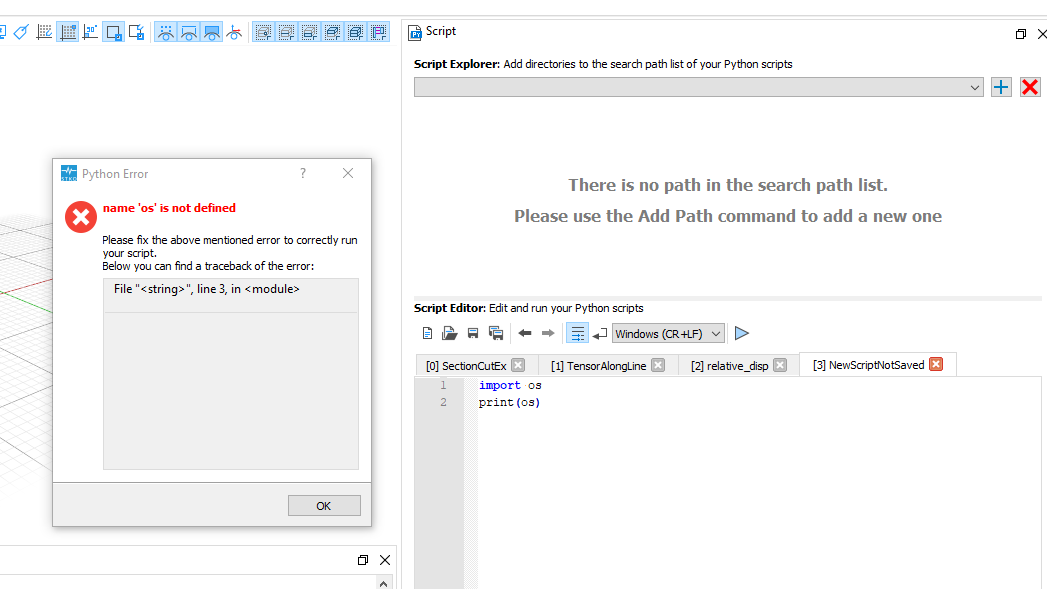
The only case in which this can happen is when you are trying to run a file from the editor that is not saved to disk.
In this case STKO tries to save it on the active path (among the ones on the script explorer).
If there's no path it cannot save it and the code cannot be run properly.
To replicate this error, I cleaned the search path, I deleted the python file but I didn't close it from the editor. So now the script on the editor is only in memory but not saved on disk:
- testos.png (55.67 KiB) Viewed 3383 times
Did something like this happened to you? Probably you deleted or renamed the folder where the original file was?