Analysis doesn't create .mpco file for postprocess

Post Reply
elial
Posts: 1
Joined: Fri Aug 23, 2024 2:10 pm

Analysis doesn't create .mpco file for postprocess

Post by elial » Fri Aug 23, 2024 2:46 pm

Hi STKO support team,
I am a student who is currently following the beginner course of STKO.
I am struggling with the analysis because it doesn't seem to write the .mpco file which in the youtube video online is used for the postprocess. When I run the analysis the following appears.
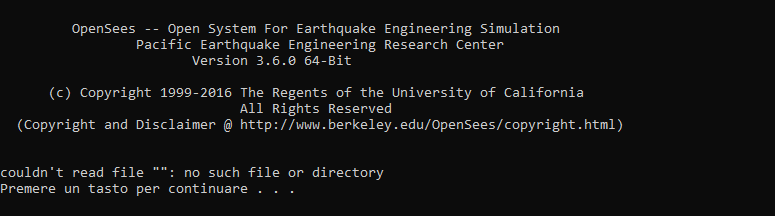
Immagine 2024-08-23 164334.png
Immagine 2024-08-23 164334.png (14.19 KiB) Viewed 417 times
However if i open a terminal and from there i run an analysis of the main.tcl file, then I obtain the .mpco file. How is it so? I already searched for a similar problem in the forum but the solution doesn't work for me. In fact I have no warnings in the console and the model is just a simple frame (downloaded from the week 2 lesson drive) fixed at both ends. Maybe I just set in the wrong way the solver wich I download from the official site?
Thank you for your time and patience.
Best regards.
Elia

kesavapraba
Posts: 468
Joined: Sat Mar 28, 2020 2:25 pm

Re: Analysis doesn't create .mpco file for postprocess

Post by kesavapraba » Sat Aug 24, 2024 8:32 am

Hi, Please ensure you followed latest installation instructions provided in STKO website. This could be due improper reference to the TCL files when you run the analysis. For the mpco files, you can check the mpco file path provided in "Recorder" window under "Analysis Settings" - mpco files will be stored in a different location if the path is not at the same location as SCD file.
:: With best wishes ::
Prabakaran Kesavan

STKO Team
Posts: 3066
Joined: Tue Oct 29, 2019 8:45 am

Re: Analysis doesn't create .mpco file for postprocess

Post by STKO Team » Mon Aug 26, 2024 1:57 pm

It's because you set up the OpenSees Kits wrong.
Ensure you have the #1 placeholder after the OpenSees executable in the command string.
STKO will replace that placeholder with the Tcl file to run

Post Reply