Page 1 of 1
How to build Plate fiber for steel joint
Posted: Mon Feb 20, 2023 7:28 am
by jingji10
Dear stko team
I am modeling a joint for steel frame,but there has some mistakes in the model.the error is “materials must be nD”.I want to know what`s wrong with the model.
Here I attach the model.
However,this model did not work.i was wondering which material I can use?what should i do to correct is?
Thanks
Re: How to build Plate fiber for steel joint
Posted: Mon Feb 20, 2023 9:52 am
by STKO Team
There are many mistakes here:
- The geometries are all separated. This will result in a singular stiffness matrix. I made a single geometry by selecting them all and using the "Merge" command.
- You cannot use a PlaneStressRebar Material. It's a material used to represent linear steel rebars smeared in a 2D plane stress model of RC shear walls. In your case, you need a full 3D Material. I used a J2 (Von Mises)
- The element for the surface geometry Must be a Shell, not a quad3D, which is for 2D analyses
- You cannot fix and imposed a non-zero displacement on the same nodes. I split the Fixities in such a way that you don't have the Displacement Fixed at the Imposed-Displacement DOFs.
Now the model runs, but It has convergence issues due to plastic failure. But make sure the boundary conditions are correct. They seem a bit strange to me
Re: How to build Plate fiber for steel joint
Posted: Wed Feb 22, 2023 1:48 am
by jingji10
Dear STKO team
Thank you for your responses
1.Follow your advices,I modeling the model but it did not work,the error is “invalid type of element or number of nodes?”where is the mistakes? I attachede the model.
2.I also want to know platefiber how to fiber section,what can I do if wants to mesh type by quadrilateral?
Re: How to build Plate fiber for steel joint
Posted: Wed Feb 22, 2023 8:25 am
by ValentinaSB
Hi jingji10,
There was a problem that you did not use a structured mesh for your shell.ASDShellQ4 element. Now it is working.
Give a look at the description of the element you are using.
https://opensees.github.io/OpenSeesDocu ... ellQ4.html
I would also advise you to watch the webinar series "Get Started in OpenSees with STKO"
https://asdeasoft.net/?stkowebinars-for-opensees. It will be helpful for you to be more confident with your modeling.
Re: How to build Plate fiber for steel joint
Posted: Thu Feb 23, 2023 1:26 am
by jingji10
Hi ValentinaSB
Thank you for your reply.
Re: How to build Plate fiber for steel joint
Posted: Thu Feb 23, 2023 8:01 am
by ValentinaSB
You are welcome!
Re: How to build Plate fiber for steel joint
Posted: Tue Mar 28, 2023 5:31 am
by jingji10
Dear
I was use structured mesh for my shell.ASDShellQ4 element.but it also have some errors .maybe I make mesh control is wrong. where is the mistakes please tell? thank you !
Re: How to build Plate fiber for steel joint
Posted: Tue Mar 28, 2023 11:09 am
by ValentinaSB
Hi,
The problem was that your geometry is not with 4 nodes, so even if you used mesh controls it could not generate the structured mesh. Look how I corrected your geometry, it would be more clear what I mean.
Notice that I have changed solver to UmfPack SOE.
Best,
Valentina
Re: How to build Plate fiber for steel joint
Posted: Wed Mar 29, 2023 7:46 am
by jingji10
Dear Valentina
I modified the model as you said, but this error is displayed when calculating, please help see where is the problem?
Re: How to build Plate fiber for steel joint
Posted: Wed Apr 05, 2023 10:32 am
by STKO Team
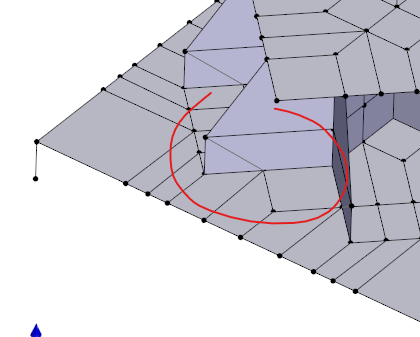
You have geometries that cannot be meshed with 4 node quads:
- Tri.png (30.27 KiB) Viewed 3719 times
So I changed everything to a triangular mesh with a triangular shell element.
But please, double check your model because the boundary conditions are really strange.